Looking for a single system that covers both tire pressure monitoring and a reliable 1080P wireless backup camera for your RV or trailer?

Product overview
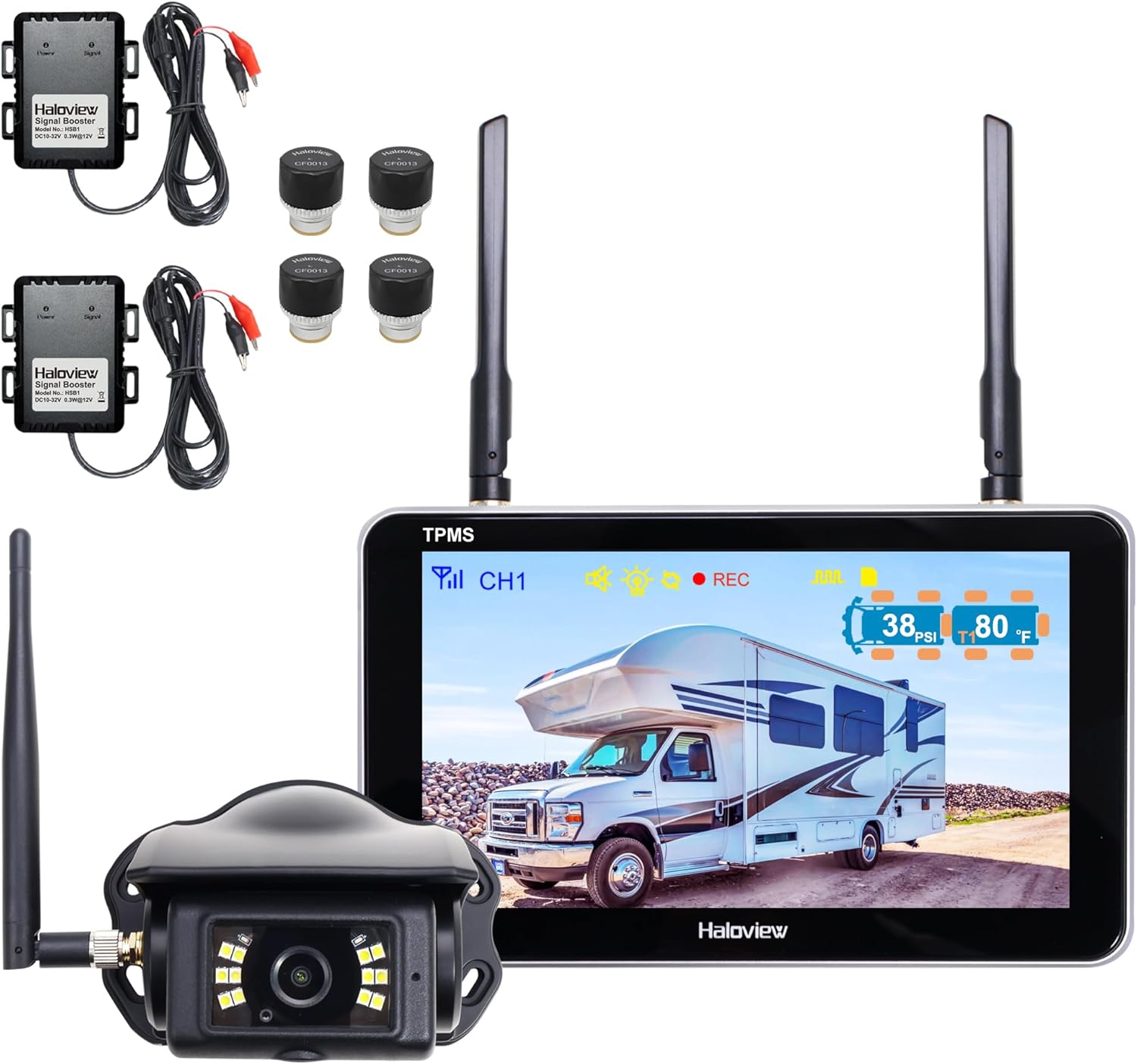
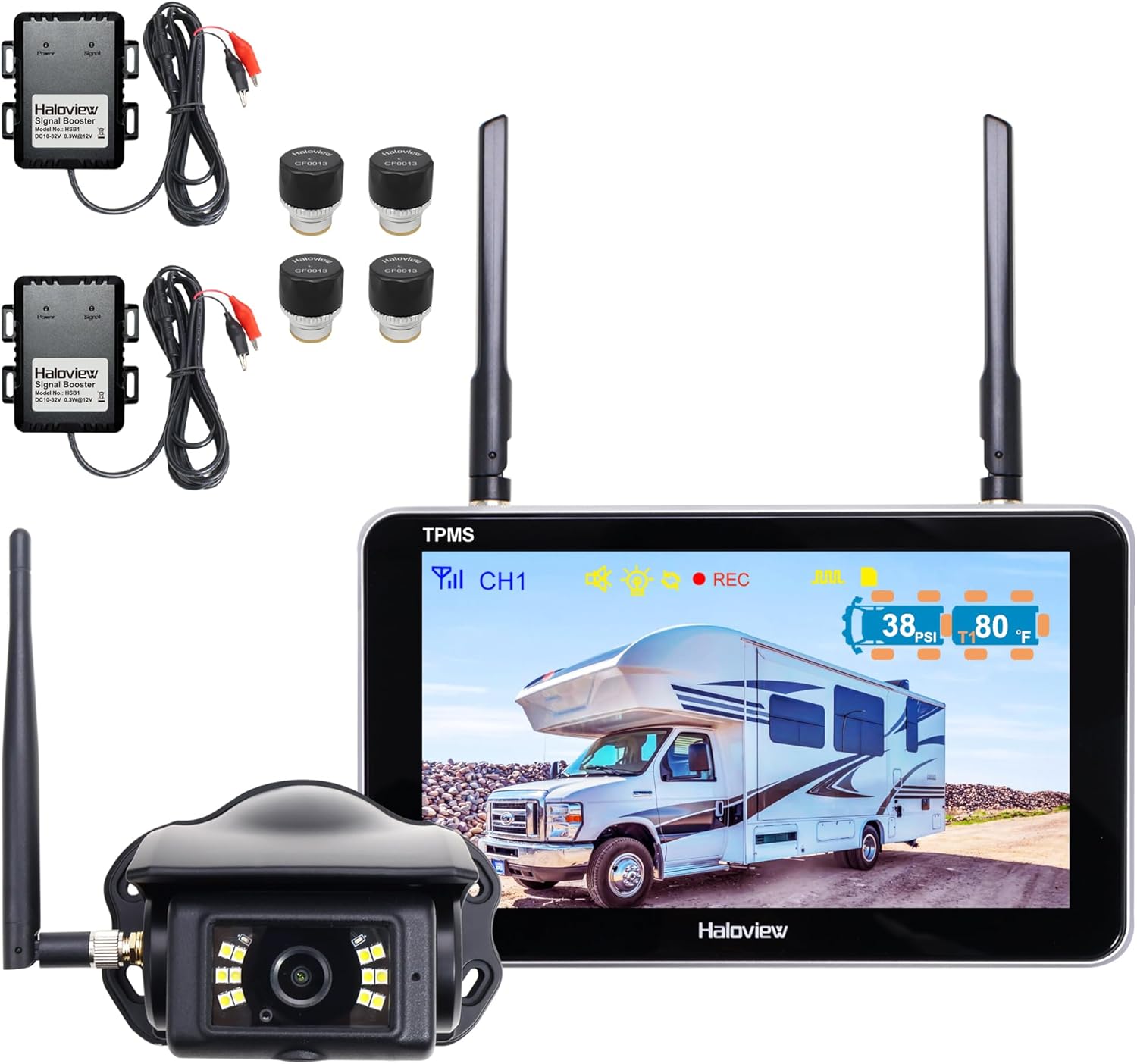
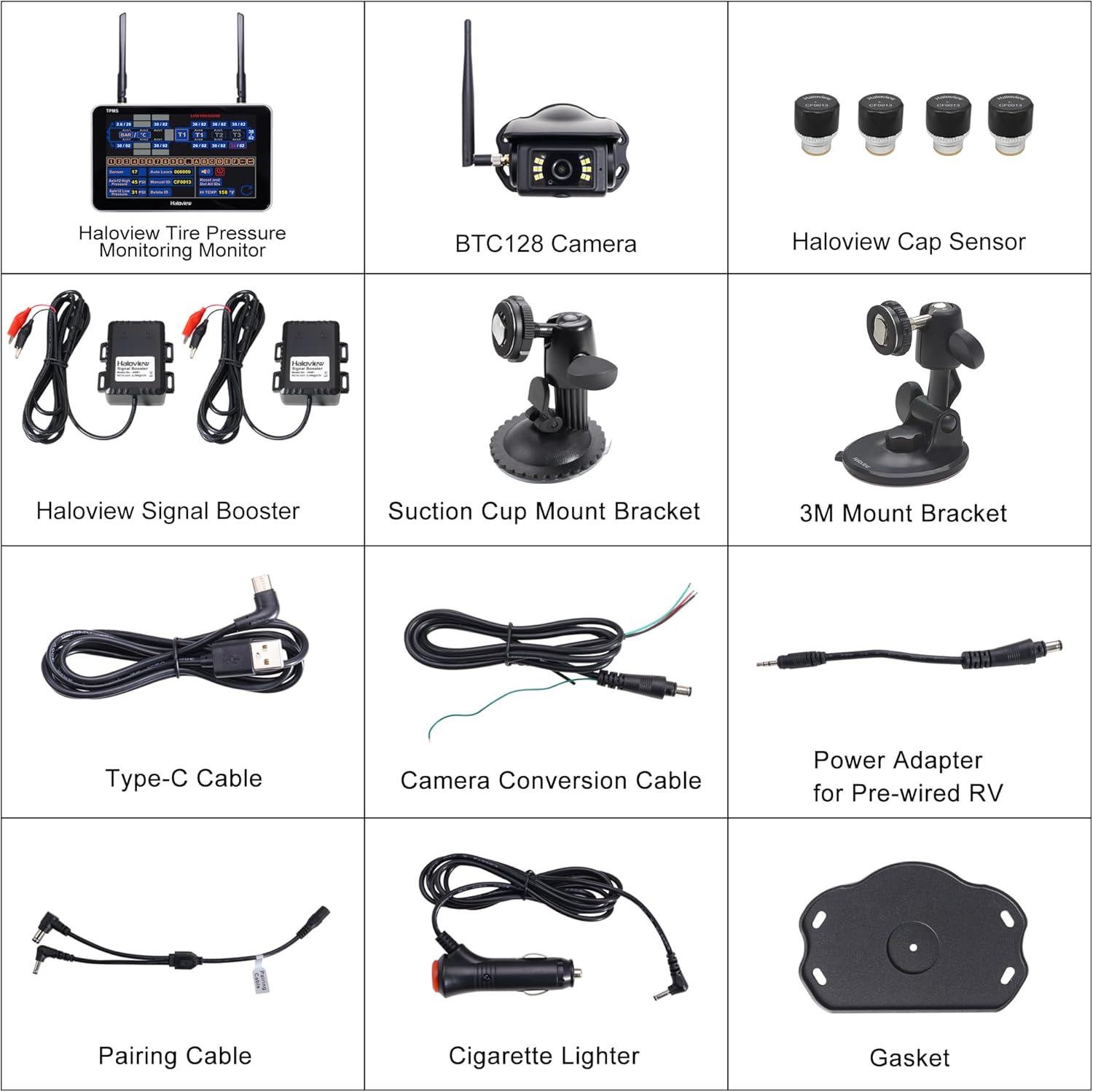
You get a combined safety package with the Haloview Byte Tango BT7 TPMS with 4 Sensors 1080P Wireless Backup Camera Monitor with Integrated Rv Tire Pressure Monitoring System, Ideal for RV Truck Trailer Camper TPMS-4. It blends a full-time tire pressure monitoring system (TPMS) with a wireless reversing/observation camera setup so you can monitor tires and blind spots from one display.
What the BT7 is and who it’s for
The BT7 is aimed at drivers who tow, haul, or live on the road — RVers, truck drivers, camper owners, and trailer haulers who want fewer blind spots and continuous tire data. If you travel long distances, carry cargo, or tow a trailer frequently, the BT7 is designed to reduce risks from tire failures and backing accidents by putting both functions on one screen.
Key features at a glance
You’ll find live tire pressure and temperature overlays on the camera view, a 1080P wireless backup camera system, durable aluminum alloy sensors, adjustable overlay transparency, and a menu with both auto and manual sensor pairing. The device supports up to four cameras and offers a wide detection range for tire pressures, making it flexible for cars, SUVs, RVs, trailers, and heavy vehicles.
Haloview Byte Tango BT7 TPMS with 4 Sensors 1080P Wireless Backup Camera Monitor with Integrated Rv Tire Pressure Monitoring System, Ideal for RV Truck Trailer Camper TPMS-4
$599.99 In Stock
Technical specifications table
This table breaks down the most important specs so you can get a quick snapshot of what you’re buying.
| Feature | Specification / Notes |
|---|---|
| Product name | Haloview Byte Tango BT7 TPMS with 4 Sensors 1080P Wireless Backup Camera Monitor (TPMS-4) |
| Camera resolution | 1080P (supports Byte Tango camera models BTC128/BTC129/BTC126/BTC133/BTC125) |
| Cameras supported | Up to 4 cameras / views |
| TPMS sensor material | Aluminum alloy (lightweight, waterproof, anti-theft, explosion-proof) |
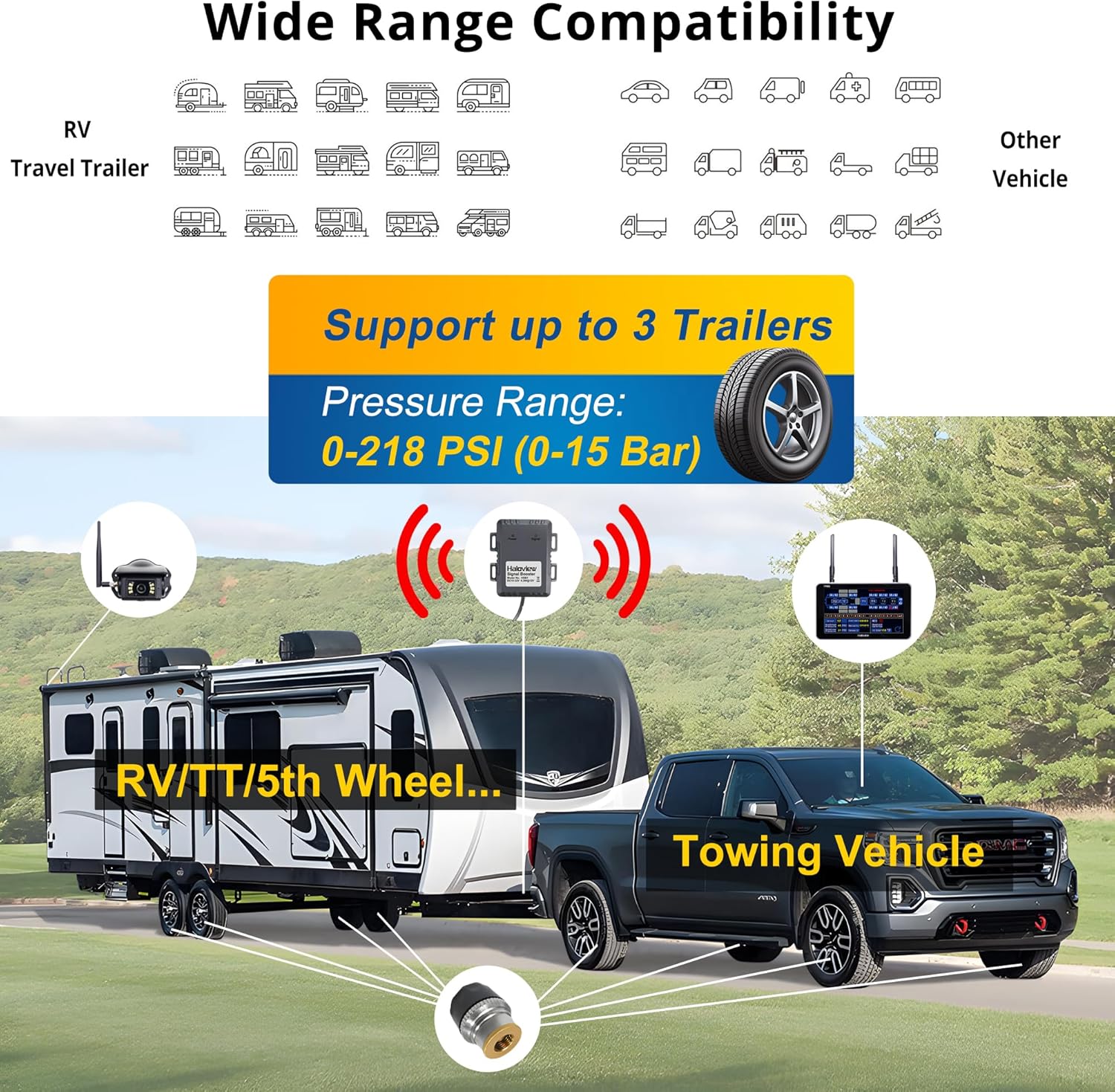
| Tire pressure detection range | 0 – 218 PSI |
| Sensor types recommended | Metal valve stems (brass); do NOT use rubber, plastic, or aluminum alloy stems |
| Pairing methods | AUTO Learn (one-click) and manual ID input |
| Overlay | Real-time pressure and temperature overlay on camera views; cycles every 5 seconds; transparency adjustable; can enable/disable |
| Alerts | High/low pressure, high temp, fast/slow leak, lost sensor signal, low sensor battery |
| Wireless range | Strong transmission; use a repeater for longer trailers |
| Use cases | Car, SUV, RV, travel trailer, truck, bus, 5th wheel, pickup, towing camper, motorhome |
| Extra notes | Recommends professional valve stem replacement to brass and sufficient clearance; sensors must not contact rim |

Setup and installation
You’ll find installation is split into camera setup, sensor installation, and pairing/monitor placement. The company offers clear menu layouts and two pairing methods to simplify initial configuration.
Camera installation basics
Mount the 1080P camera where it gives the best rear or cargo view, and wire the camera power properly (usually to reverse light or continuous power depending on desired function). The wireless camera sends video to the monitor, and you can set up up to four camera views to eliminate blind spots around a large vehicle or trailer.
Sensor installation and valve recommendations
Install the tire sensors onto metal (brass) valve stems only, and have a tire pro replace the stems if your wheels use rubber, plastic, or aluminum alloy stems. Ask the shop to leave enough clearance so sensors won’t touch the rim — contact with the rim can cause damage to both sensor and wheel.
Pairing the sensors and initial menu setup
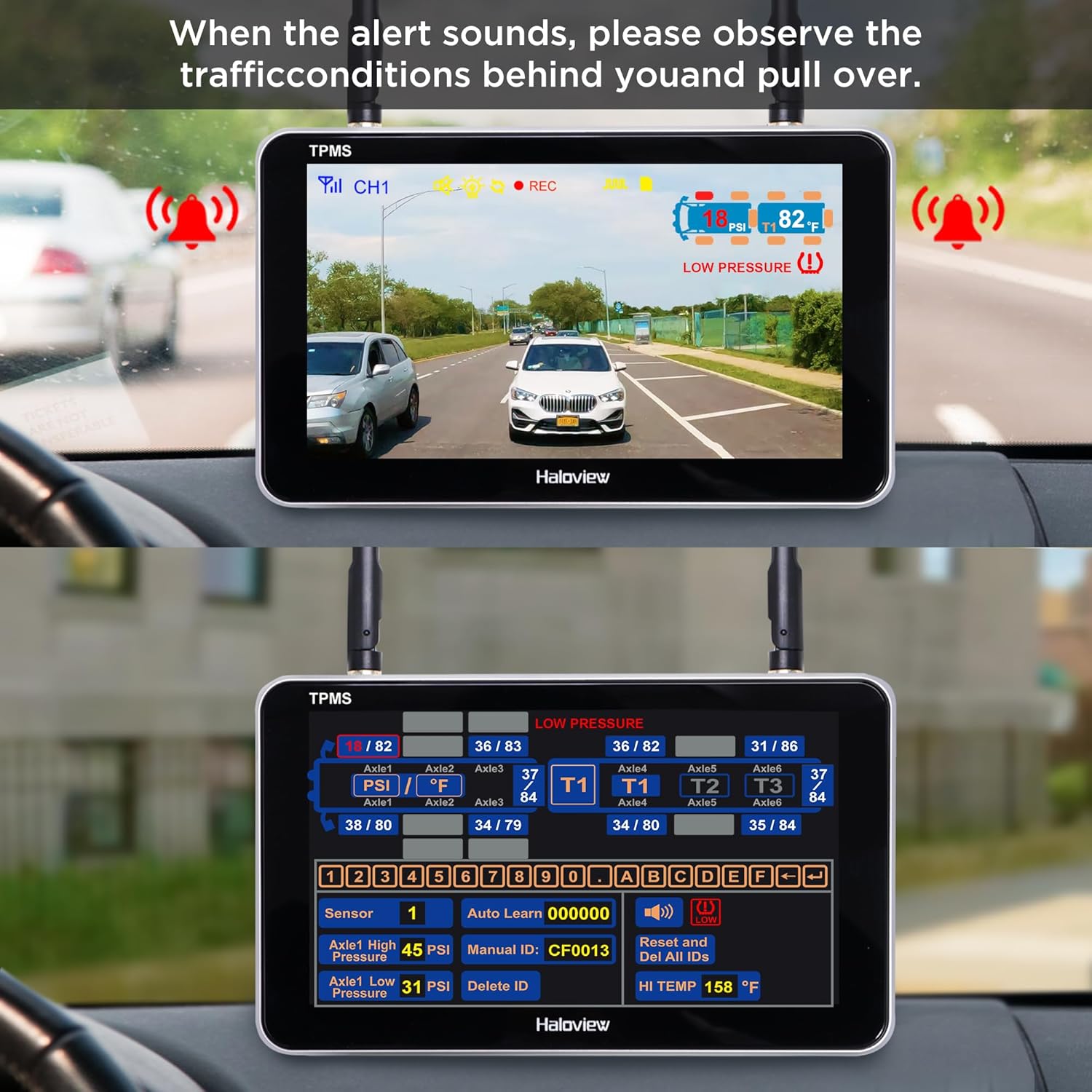
You can pair sensors using AUTO Learn for a fast, one-click pairing experience, or manually input sensor IDs if you prefer exact control. The TPMS menu shows tire layout, code buttons, and keyboard in one view, so you’ll be able to assign sensors to the exact tire positions without guesswork.
Performance in daily use
Your day-to-day experience will hinge on the reliability of the TPMS readings, camera clarity at 1080P, and the system’s alerts. The BT7 positions both tire data and camera feed in one interface to reduce eyes-off-road time, which is especially valuable during long hauls.
TPMS accuracy and alerting behavior
The BT7 continuously displays real-time tire pressure and temperature and will issue visual and audio alerts when readings stray from preset safety parameters. Alerts cover high/low pressure, high temperature, fast/slow leaks, lost sensor signal, and low sensor battery — so you’ll be informed quickly about most tire-related risks.
Camera quality, latency, and usefulness
The 1080P camera provides a clear, high-definition view useful for reversing, monitoring cargo, and checking blind spots. Latency is generally low on these wireless setups, but your experience will depend on placement, interference, and whether you’re using multiple cameras; you can expect practical, usable video for routine backing and monitoring tasks.
Wireless signal strength and range considerations
Signal transmission is strong for vehicle-to-display connections, but longer trailers or heavy interference environments may require a wireless repeater for consistent performance. For very long rigs, the manufacturer specifically recommends a repeater to maintain sensor and camera connectivity across extended distances.
Features and usability details
You’ll appreciate how the BT7 integrates TPMS overlays into the camera view and provides flexible display options. The controls aim to be intuitive so you can customize how much data is visible while reversing or driving.
Dual functionality: camera plus TPMS on one monitor
Having both backup camera views and tire readings on the same monitor reduces the need for additional displays and helps you react faster to problems. The overlay cycles through tire data every 5 seconds so you can see each tire’s status without navigating away from the camera feed.
Display controls and overlay customization
You can enable or disable the TPMS overlay and change its transparency to minimize obstruction of the camera’s field of view. Overlay transparency control is handy when you need a full view while reversing but still want access to tire info at a glance.
Sensor durability, environmental resilience, and battery life
Sensors are aluminum alloy, waterproof, and designed to be tough and anti-theft. They’re described as explosion-proof and suitable for a variety of climates and weather conditions, though battery life will vary with environmental factors and sensor transmissions; you’ll receive low battery alerts so replacements don’t come as a surprise.
Compatibility with vehicles and accessories
The system works with a wide range of vehicle types including cars, SUVs, RVs, trailers, trucks, buses, 5th wheels, and motorhomes. Note that camera compatibility is limited to Haloview Byte Tango camera models listed (BTC128/BTC129/BTC126/BTC133/BTC125), so if you already have other camera brands, check compatibility first.
Pros and cons
You’ll want a balanced view before deciding. The BT7 brings convenience and safety, but there are practical considerations to understand, like the need for proper valve stems and potential range limitations on long rigs.
Pros
You get integrated TPMS and 1080P camera functionality on a single monitor, real-time overlays with adjustable transparency, multiple alert types to catch most tire issues early, robust aluminum alloy sensors built for rough conditions, and flexible pairing options for easy setup. The system supports up to four cameras, which is helpful for large vehicles and trailers that have multiple blind spots.
Cons
You’ll need metal (brass) valve stems and you should avoid rubber, plastic, or aluminum alloy stems — that could add an installation expense if your current stems aren’t compatible. Long trailers might require a repeater to maintain signal reliability, and camera compatibility is limited to Haloview Byte Tango models, so you may not be able to reuse existing cameras from other brands.
Real-world testing notes
In everyday testing scenarios, you’ll notice the benefit of continuous tire monitoring during long hauls and the usefulness of a clear rear camera when backing into tight campgrounds or loading docks. Small practical details like overlay transparency and auto-cycling tires every 5 seconds make the information flow less intrusive while staying accessible.
Long trips, towing, and highway behavior
On long drives or when towing a heavy load, the BT7’s alert system will keep you informed when pressures change — especially important for trailers and RVs where a slow leak can develop unnoticed. The ability to view tire pressure on the camera view helps you pick up anomalies while stopped or during breaks, and the monitor’s alerts mean you can take action before a roadside emergency.
Weather, off-road, and durability experiences
Sensors are built to withstand rain and varied temperatures, and their aluminum construction gives you confidence in rougher conditions. You’ll want to monitor battery life in extreme cold because lower temperatures can reduce battery performance; the low battery alert helps here but plan on seasonal checks and replacements.
Troubleshooting and tips
You should expect a few common issues that are easily solvable if you follow best practices during installation and use. Preparing the system correctly and understanding pairing and valve stem requirements will save you time.
Common issues and quick fixes
If a sensor loses signal, check for line-of-sight obstructions, interference from other wireless equipment, or the need for a repeater on long trailers. If a sensor reads oddly high or low, confirm it’s mounted on a recommended brass valve stem and that there’s enough clearance from the rim. For camera glitches check the camera power wires and ensure the monitor firmware is current.
Best practices for installation and ongoing maintenance
Have a tire pro replace valve stems with brass stems if needed, and ask them to leave adequate clearance from the rim. Mount cameras in secure positions, route power carefully to avoid shorts, and test every sensor after pairing. Keep spare sensor batteries and a small toolkit handy, and plan a seasonal check so sensor batteries don’t fail at inconvenient moments.

Detailed pairing, mounting, and usage walkthrough
You’ll benefit from a step-by-step approach: install cameras and run power, replace and prepare valve stems, attach sensors, pair via AUTO Learn or manual ID, assign tires in the menu, and test alerts before you depart. This ensures you catch any configuration issues while still at home or in a shop.
Step-by-step pairing instructions
- Install the monitor and power it up.
- Mount the cameras and wire power (reverse or constant depending on function).
- Set each sensor onto a brass valve stem and tighten.
- Use AUTO Learn on the monitor for one-click pairing, or choose manual ID to input sensor IDs exactly.
- Confirm each sensor reports correct pressure and temperature in the menu and on the overlay.
Mounting recommendations for best camera angles
Place the camera centrally at the rear when possible for an even field of view, or use multiple cameras (up to four) to cover the sides or front. Secure mounts at the right height avoid dirt spray and give a stable image; make sure wiring is weatherproofed and protected from chafing.
Comparison with competing products
When compared to standalone TPMS or separate camera systems, the BT7’s combined approach reduces clutter and simplifies monitoring. Many users appreciate a single-screen solution instead of juggling a separate TPMS display and rearview monitor.
Strengths versus rivals
The main strengths are integrated overlays on a 1080P camera view, the broad pressure detection range (0–218 PSI), durable sensor construction, and the ability to handle multiple cameras. These make it a compelling choice for RV and trailer owners who need both capabilities.
Potential drawbacks compared to specialized devices
If you only want a TPMS or only a camera, specialized systems may offer deeper features in one area (for example, multi-point camera controls or cloud-based TPMS analytics). Additionally, ecosystems that lock you into one type of camera (Byte Tango cameras for the BT7) might be less flexible than fully brand-agnostic systems.
Installation cost and value considerations
You’ll need to factor in any additional costs for brass valve stems, potential repeater hardware for long trailers, and professional installation if you’re not comfortable mounting cameras and changing valve stems. Even with these extras, many buyers find the combined functionality saves money versus buying separate high-quality TPMS and camera systems.
Estimating total cost for a complete setup
Factor the monitor and sensor kit price, potential camera(s) if not included, valve stem replacements (per wheel), and optional repeater hardware for long trailers. Installation labor at a tire shop or electronics installer will increase cost but can prevent mounting and compatibility mistakes.
Who should buy the Haloview Byte Tango BT7
You should strongly consider this system if you routinely tow, haul heavy loads, or travel in an RV or motorhome and you want continuous, at-a-glance tire monitoring plus backup/cargo camera coverage. It’s particularly good for owners of trailers or rigs where a single monitor for both functions reduces clutter and improves reaction times to alerts.
Who might want to look elsewhere
If you only need a camera or only a TPMS, a single-purpose unit might save money and offer deeper features in that one domain. Also, if you can’t or won’t replace valve stems with brass, this system isn’t a good fit because rubber, plastic, or aluminum alloy stems are not recommended.
Maintenance and long-term ownership
You’ll want to keep an eye on sensor batteries, maintain valve stem health, and periodically check camera mounts and wiring. Firmware updates for the monitor may add features or stability improvements, so check Haloview support occasionally.
Routine checks and seasonal tips
Check sensor battery status regularly and when seasons change; replace batteries before long trips if levels are borderline. Inspect camera lenses for dirt and ensure mounts and wiring are corrosion-free. If you park the vehicle for long periods, consider storage practices that reduce battery drain on the system.
Frequently asked questions (brief)
You’ll probably have a few practical questions before buying; these answers address the most common concerns.
-
Can the TPMS overlay be turned off?
Yes, you can enable or disable the TPMS overlay and adjust transparency to prevent blocking the camera view. -
Will the sensors fit my wheels?
Sensors require metal (brass) valve stems. Ask a tire shop to replace stems if necessary and to leave clearance from the rim. -
Is a repeater necessary?
For long trailers or signal-challenging environments, a repeater is recommended to ensure consistent communication. -
What cameras are compatible?
Compatible cameras are Haloview Byte Tango models BTC128, BTC129, BTC126, BTC133, and BTC125.
Final verdict
You’ll find the Haloview Byte Tango BT7 TPMS with 4 Sensors 1080P Wireless Backup Camera Monitor to be a solid, practical investment if you need both reliable tire monitoring and a high-quality reversing/monitoring camera system in one package. It reduces the number of devices in your cab, keeps essential safety data visible while backing or driving, and has the rugged sensor design and alert coverage you need for long trips.
Recommendation summary
If you haul, tow, or travel extensively in an RV, bus, truck, or trailer and can accommodate brass valve stems (or have them installed), the BT7 offers a strong balance of features, usability, and safety. Keep in mind the potential need for a repeater on long rigs and the camera compatibility constraints, but overall this system delivers practical, integrated monitoring that can prevent headaches and roadside emergencies.

Disclosure: As an Amazon Associate, I earn from qualifying purchases.