Have you ever wished you had a reliable, fully wireless backup camera system that just sticks on and works without complex wiring?

Quick overview of the product
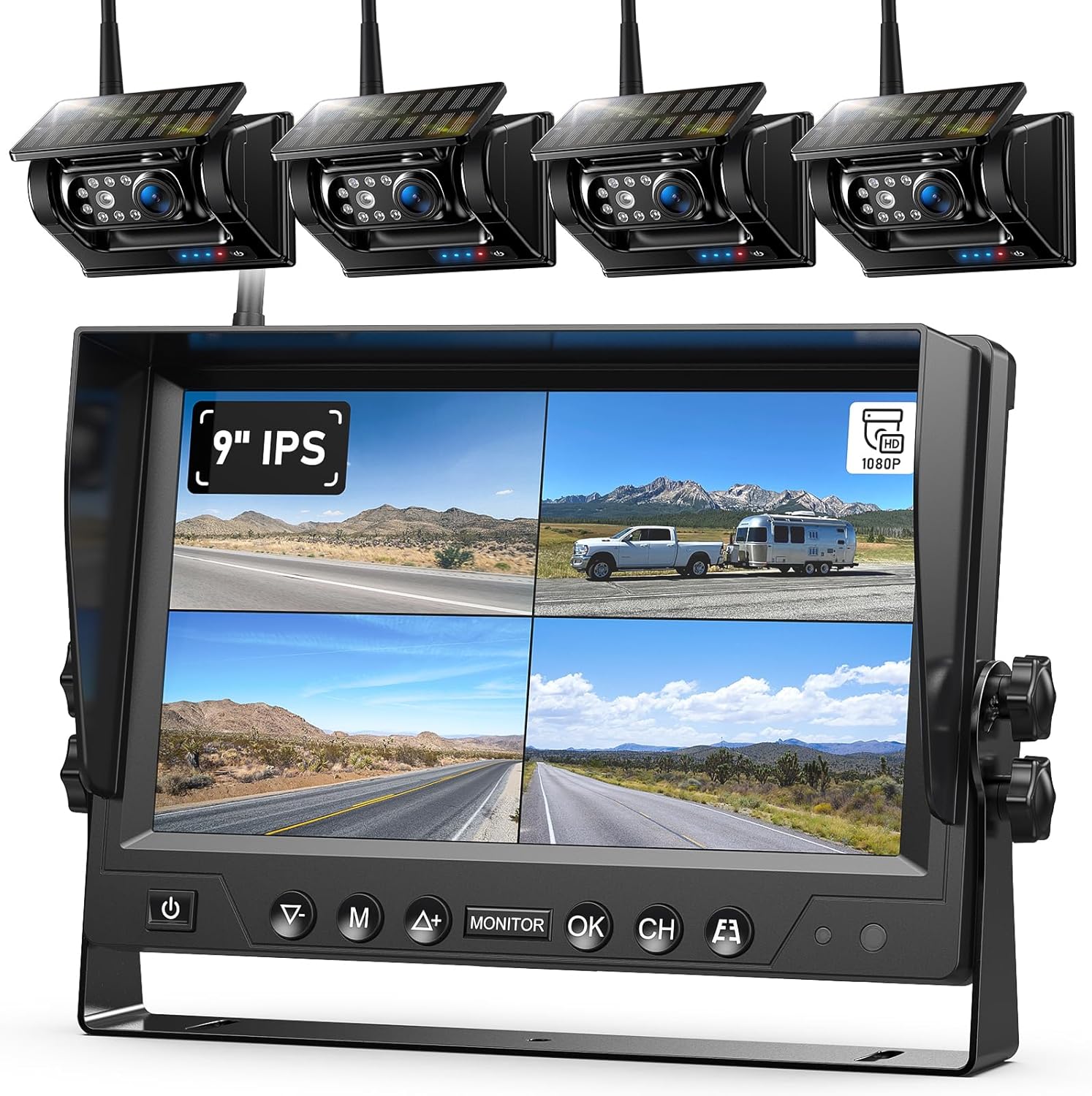
You’ll get a 9″ HD1080P monitor and four magnetic wireless cameras named “4 Magnetic Solar Wireless Backup Camera HD1080P 9″ Loop Recording Monitor, Quad RV Rearview Backup Cameras Wireless System for Trailer RV Trucks, Built-in 9600mAh Solar Battery, BL904.” This system is designed to be plug-and-play for RVs, trailers, trucks, and other large vehicles, with solar-assisted rechargeable cameras and loop DVR recording on the monitor.
What this section covers
This part gives a concise snapshot so you can decide if you want to read further. You’ll find the key selling points summarized so you know the most important details at a glance.

Key specifications and features
You’ll want to know the basics quickly, so here’s a compact breakdown of the main specs and standout features for easy comparison against other systems.
| Feature | Details |
|---|---|
| Monitor | 9″ HD 1080P DVR monitor, quad-split capable |
| Cameras included | 4 magnetic wireless cameras (front/rear view, not suitable for vertical side mounting) |
| Battery | Built-in 9600mAh rechargeable battery per camera |
| Charging | Solar-assisted charging + USB-C charging cable included |
| Signal range | Up to 300 ft open distance; practical in-vehicle range ~36–50 ft |
| Recording | Loop DVR recording on monitor (automatic overwrite) |
| Startup/shutdown | Automatic camera on/off tied to monitor power |
| Mounting | Strong magnetic base; metal plate required on non-metal surfaces |
| Use cases | Cars, RVs, trailers, trucks, campers, boats, tractors, horse trailers, 5th wheels |
| Notable limits | Cameras cannot be mounted vertically for side-view use |
Why this matters
Having these specs in one place makes it easier for you to compare features you care about—like battery capacity, signal range, and the number of included cameras—so you can quickly decide if this system fits your vehicle and driving needs.
Design and build quality
You’ll notice the cameras use magnetic bases for quick mounting, and the monitor is a sizable 9″ unit that acts as a DVR and display. The build appears focused on convenience and modularity rather than permanent installs.
What to expect from the hardware
The cameras feel sturdy enough for exterior vehicle use and are weather-resistant for general conditions, although you should still avoid abuse from extreme impacts. The strong magnets make temporary placement fast, but you’ll need a metal mounting surface or metal plate for non-metallic trailers and RV shells.

Monitor and user interface
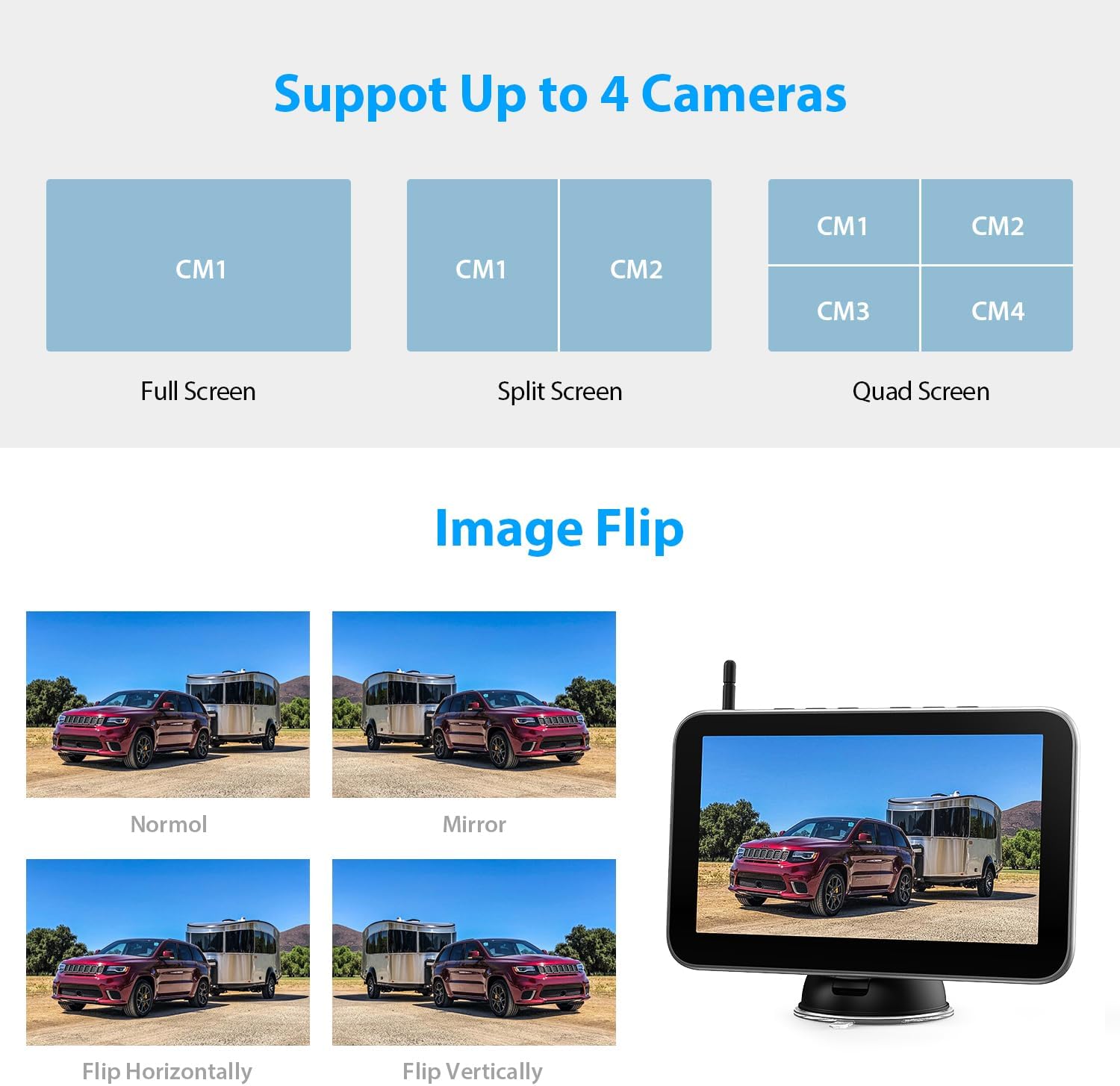
The 9-inch monitor is larger than many backup monitors and supports HD1080P display, which gives you clearer detail on the screen. The system supports single, dual, and quad-screen displays so you can watch up to four cameras at once.
Monitor usability and DVR
You’ll appreciate the DVR loop recording that automatically overwrites old footage, so you don’t have to manage files constantly. The interface is straightforward for basic operations—switching camera views, playback, and adjusting settings—though it’s not as sophisticated as high-end security DVR systems.
Camera performance: resolution, image clarity, and field of view
Each camera streams in HD 1080P to the monitor, which helps you see license plates, obstacles, and lane markers more clearly than lower-resolution solutions.
Real-world image quality
In daylight and well-lit scenes, you’ll get strong clarity and useful detail for reversing and lane checks. At night, image quality drops as is normal with small sensor designs, but IR or enhanced low-light features will still keep objects visible within close range.
Night vision and low-light performance
The cameras include night/low-light capabilities to maintain visibility in dim conditions. While not on par with dedicated night-vision security cameras, these units still provide practical nighttime backup support.
Practical nighttime tips
For best results at night, mount cameras with a clean, unobstructed view and avoid pointing them directly at bright lights which can cause glare. You’ll notice the cameras perform best within their practical range—typically within the parking/reversing distances you care most about.

Battery life and solar charging
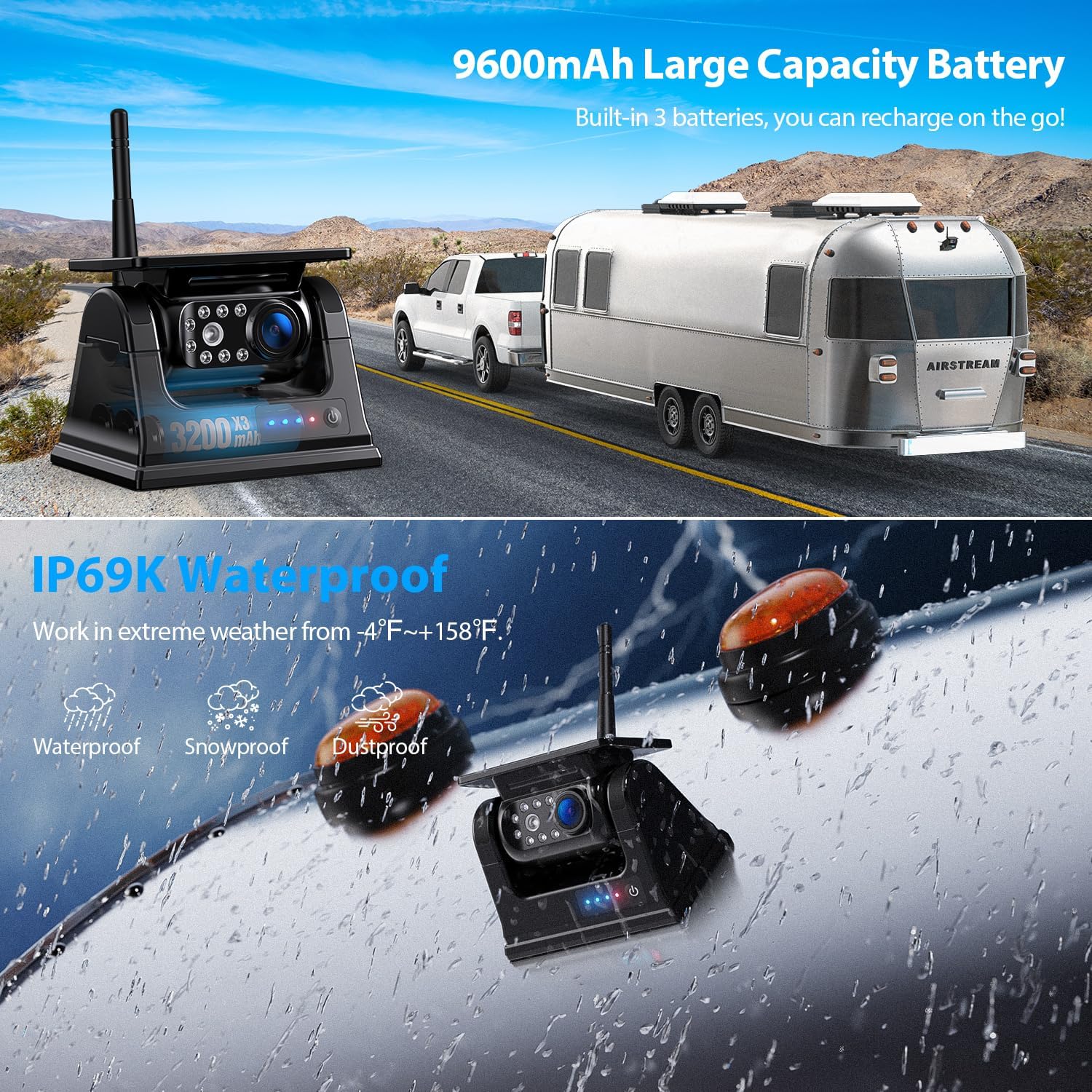
The built-in 9600mAh battery in each camera is a major selling point. With solar-assisted charging, you get extended runtime and reduced need for manual recharging, especially on sunny days.
How the solar system helps you
You can rely on solar top-up to maintain charge during regular use, but you’ll want to plug in via the included USB-C cable during extended low-sun periods (winter or shade). The automatic start/stop function also helps preserve battery life because cameras only power when the monitor is on.
Installation and mounting options
One of the biggest conveniences is that you won’t need to drill holes or run long wires. The magnetic bases mean you can attach cameras to metal surfaces in minutes.
Step-by-step basics for installation
- Choose mounting points with a clear line of sight and minimal obstruction.
- Attach the camera to metal surfaces using magnets or affix a magnetic metal plate to non-metal bodies.
- Set up the monitor inside the cab, plug in power, and sync cameras if required.
- Position and test each camera to confirm angle, focus, and signal strength.
Strong magnetic base: pros and cons
The magnetic mounting allows rapid repositioning and is ideal for temporary setups, which is great if you move cameras between vehicles or trailers. However, if you expect rugged off-road vibration or extended highway speeds, secure the camera further or use additional mounts.
When magnets work best
Magnets are ideal for weekend trailers, temporary rental vehicles, or if you share cameras among multiple rigs. If your vehicle’s surface is fiberglass or wooden, you’ll need to add a magnetic plate, which is a simple and inexpensive extra step.
Signal stability and range
This system advertises up to 300 feet open distance and practical ranges of 36–50 feet on a vehicle. It includes a built-in signal booster to reduce dropouts and lag.
What to expect in daily use
You’ll likely experience stable transmission while driving, even at highway speeds, but signal strength is affected by obstruction, interference, and vehicle layout. Expect the best results when the monitor and cameras have a relatively line-of-sight path and minimal metal or electronic interference between them.
DVR loop recording and storage
Your monitor records footage onto internal storage and uses loop recording so older footage gets overwritten automatically. That removes the need for constant manual storage management.
Playback and retrieval options
You can access recorded clips directly on the monitor for quick playback. For longer-term archiving, you’ll need to transfer clips to a computer or external storage, so plan to back up important footage promptly if you want to preserve it.
Durability and weather resistance
The cameras are marketed for outdoor vehicle use, so they’re built to handle rain, dust, and routine road grime. While the product details don’t list an exact IP rating, the design targets automotive-grade weather exposure.
Caring for the units
To keep the cameras reliable, wipe lenses regularly, avoid pressure washing directly at the camera seals, and periodically inspect the magnet housing for corrosion or wear. In cold climates, battery efficiency will drop, so plan to provide additional charging during winter.
Mounting restrictions: not for vertical side-mounts
You cannot mount these cameras vertically as a dedicated side-view camera—the design limits vertical orientation usage. They’re primarily meant for rear/front views and standard horizontal mounting.
Workarounds and alternatives
If you need side-view monitoring, consider adding a separate side-view dedicated camera system or ask the seller if they offer a compatible vertical-mount camera option. For many users, repositioning one of the four cameras to a slightly different horizontal angle can still provide a useful side perspective.
Use cases: who benefits most
This system is ideal if you manage RVs, trailers, pickups, horse trailers, or commercial trucks where wiring is impractical or you want a portable option. You’ll appreciate the no-drill setup if you rent trailers or frequently swap cameras between vehicles.
Examples of practical applications
Use it to back into tight spots, monitor towed vehicles, keep an eye on animals in horse trailers, or increase safety while maneuvering a 5th wheel or tractor. The portability also works well if you have seasonal equipment that needs visual monitoring.
Comparison: wireless magnetic vs wired backup camera systems
Wireless magnetic systems like this are fast to install and flexible, while hardwired systems tend to offer more permanent stability and sometimes higher signal reliability.
Trade-offs you should consider
You’ll give up some permanence and possibly minimal signal robustness for portability. If you want a permanent, concealed install with power directly from the vehicle, a wired system might be preferable. If you want convenience and mobility without drilling, this BL904 system fits well.
Troubleshooting common issues
You might run into occasional signal drops, magnet slips on curved surfaces, or decreased battery performance in low sun conditions. These are common but generally solvable with a few adjustments.
Simple fixes you can try
- Reposition the monitor antenna or camera to improve line-of-sight.
- Add a metal plate on non-metal surfaces for stronger magnetic hold.
- Charge cameras via USB-C during prolonged low-sun months.
- Reboot the monitor or re-sync cameras if you see freezing or lag.
Tips for optimal placement and performance
Where you put cameras makes a huge difference. Small angle changes can remove blind spots or reduce glare from sun and headlights.
Practical placement advice
- Mount cameras slightly wider than the vehicle’s rear corners for better coverage.
- Keep lenses free of obstructions and road spray.
- Avoid pointing cameras directly at reflective surfaces.
- Angle cameras down a bit to prioritize nearby hazard detection during reverse.
Maintenance and care best practices
Regular maintenance extends lifespan and keeps images clear. Simple cleaning and a few checks will prevent many annoyances.
Recommended routine care
Clean lenses weekly in wet conditions, inspect magnetic bases for debris, verify solar panels are clean so they can charge efficiently, and check battery levels periodically if you use the system often.
Accessories and add-ons you might consider
You might want extra magnetic metal plates, additional cameras, an extra monitor, or mounting brackets for semi-permanent installs.
Useful accessories to improve usability
- Magnetic mounting plates for non-metal surfaces.
- Additional cameras if you need more viewpoints (check seller for compatibility).
- A sunshade for the monitor to improve daytime visibility.
- External storage options to save important DVR clips long-term.
Safety and legal considerations
Using backup cameras helps reduce blind-spot accidents, but you should still rely on mirrors and safe maneuvering practices. Know your local laws about windshield-mounted displays and ensure the monitor placement doesn’t obstruct your view.
How to remain compliant and safe
Mount the monitor in a position that’s accessible but not blocking the windshield. Use the camera as an aid, not the sole means of situational awareness.
Price and value assessment
This system competes in the budget-to-midrange wireless camera market. You’re paying for the convenience of a large HD monitor, four cameras, and solar-assisted charging in a package that’s designed to be easy to move and install.
Is it worth the money?
If you value easy setup, portability, and solar charging for cameras, you’ll likely find strong value here. If you want a high-end permanent install with maximum durability under extreme conditions, you might want to compare higher-tier wired or professional systems.
Frequently asked questions (FAQ)
You probably have questions about mounting, battery life, adding cameras, and warranty. This section answers those common queries so you can make an informed purchase.
Can I add more than four cameras?
Yes, the system supports up to four cameras by default. If you need more, contact the seller to purchase compatible additional cameras and confirm compatibility with the monitor’s DVR.
How often do I need to charge the cameras manually?
With adequate sun exposure, the solar panels will keep the cameras charged for routine use. In low-sun seasons, you should plan to charge periodically via USB-C—frequency depends on sunlight, temperature, and usage patterns.
Will metal interference from the vehicle affect signal?
Large amounts of metal can influence wireless signal transmission. Keeping the receiver and cameras positioned to minimize obstruction helps maintain a stable connection.
Troubleshooting checklist for signal and power issues
If you experience problems, run through this quick checklist to identify and fix common causes.
Step-by-step troubleshooting
- Confirm monitor and cameras are fully charged.
- Check line of sight between monitor antenna and cameras.
- Clean solar panels to ensure effective charging.
- Reboot and re-sync the cameras with the monitor if needed.
- Inspect magnetic mounts and secure them with a metal plate on non-metal surfaces.
Warranty and customer support
Warranty and after-sales support are important for electronics. Check the seller’s warranty period and support channels before you buy so you know how to handle defects or issues.
What you should verify before purchasing
Ensure you understand the return window, warranty length, and whether the seller offers spare parts like extra cameras or replacement magnets. Good customer support can save you time if you run into setup issues.
Final verdict
If you want a user-friendly, portable camera system with solar-recharged cameras and a large HD monitor, this BL904 setup will meet most of your needs. You’ll especially value the magnetic mounts and solar charging for temporary or semi-permanent vehicle monitoring.
Who should buy this
You should consider this system if you: operate RVs or trailers, switch cameras between vehicles often, want minimal installation hassle, or need a camera kit that’s largely maintenance-free thanks to solar charging.
Buying tips and recommended setup
Before you commit, plan mounting points, ensure you have a metal surface or metal plates for magnets, and decide if you need extra cameras or accessories.
Quick buying checklist
- Confirm vehicle surface for magnetic mounting or budget for metal plates.
- Decide monitor placement to avoid windshield obstruction.
- Consider extra storage or backup solutions for important recordings.
- Check seller’s policy on additional cameras if you plan to expand.
Summary you can act on
You’ll get a powerful set of features—HD display, four magnetic solar cameras, large battery capacity, and easy installation—that make this system a strong fit for many drivers who need flexibility without wiring. If mobility, convenience, and solar charging matter most to you, the BL904 is a solid option to consider.
Final suggestion
If you want to reduce setup time and keep your vehicles safer with minimal hassle, go ahead and test this system. Keep one camera in reserve as a spare, clean the solar panels regularly, and mount the monitor where it’s easy to glance without blocking your view.

Disclosure: As an Amazon Associate, I earn from qualifying purchases.